Chat replay archive
We archive the chat too — and we mean every message.
When VOD Manager grabs a stream, the chat replay rides along. Every message, sub, raid, cheer, badge, and emote — stored next to the VOD, in your storage, kept for as long as you keep the broadcast.
Two artifacts per VOD
Raw data plus a viewer you can drop in a browser
Source of truth
.chat.json
The raw chat data — every message, user ID, badge, emote, cheer, with stream-relative offsets and wall-clock timestamps. Small file, machine-readable, future-proof.
Self-contained viewer
.chat.html
A single HTML file you can drop in any browser, no internet required. Badges, emotes, and cheermotes are inlined — works on a plane, in 10 years, in a sandbox.
Same folder as the VOD
Side-car layout
Each chat artifact lands next to the .mp4 in your storage, with the same filename stem. Find one, find both.
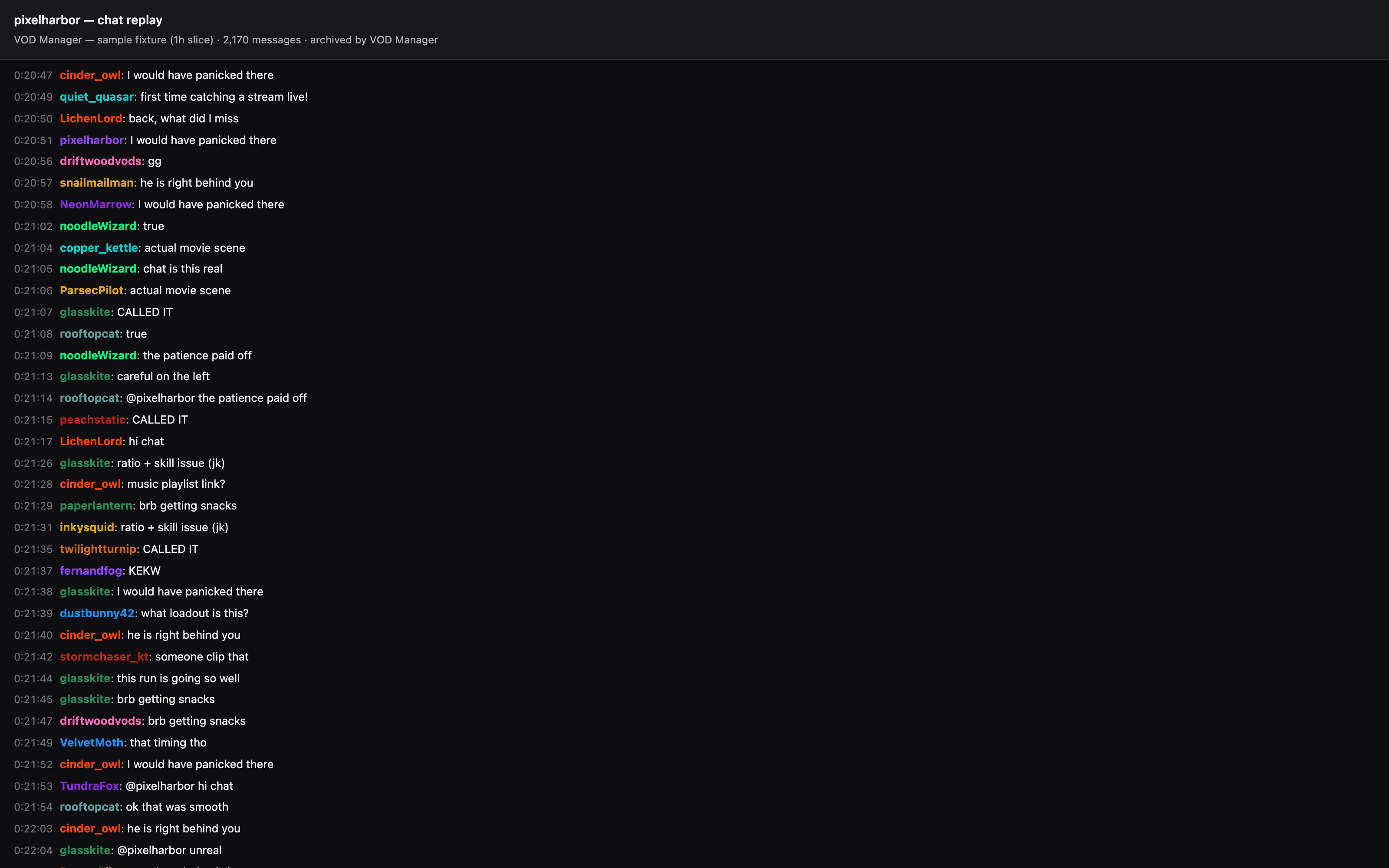
What's actually in there?
Everything Twitch makes available on the chat replay endpoint. The JSON file is the complete record; the HTML is the convenient way to read it.
- Every chat message with author, timestamp, and stream-relative offset.
- Sub messages, gift subs, resubs, raids, cheers, hosts, bans, timeouts.
- Channel badges, global Twitch badges, and bit-tier cheermotes (visible in the HTML viewer).
- First-party Twitch emotes plus BTTV, FFZ, and 7TV channel emotes when available.
- Reply threads and mentions are preserved in the JSON for future tooling — the viewer renders them inline.
Live chat capture (the literal real-time IRC stream) is a separate project we may build later for zero-loss capture. For now we use Twitch's chat replay endpoint, which is best-effort and may drop messages on very high-load streams.
How to view it
From any archived VOD, click Download chat. We hand back a presigned URL pointed at the .chat.html in your bucket. Open the file in any browser — Chrome, Firefox, Safari — and the chat replay just works. No internet, no plugins, no Twitch login.
On Cloud Drive providers (Google Drive, Dropbox, OneDrive), the chat sidecars sit in the same folder as the VOD — open them directly from the drive's file browser.
How big is it?
The raw JSON is small — 5–50 MB for most streams. The HTML viewer is bigger because it embeds emote and badge images, typically 100–400 MB for an emote-heavy multi-hour stream.
Both files count toward your storage quota. On the free tier, if combined VOD + chat would push over the per-VOD cap, we keep the JSON and skip the HTML — your archival data is always preserved; the viewer is the part that gracefully drops.
Why bother
Chat is half the broadcast
Without chat, a VOD is a video of someone reacting to invisible context. The shoutouts, the running jokes, the tip cheers, the moment the chat lost it — they're all in the chat track, and they're what makes a re-watch feel like the night.
Preservation
Twitch eventually deletes it
When the VOD's 14 / 60-day retention timer runs out, the chat goes too. Save both, save them once.
Community
Receipts for the moment
First-time subs, drama, cheer-tier moments, raid greetings — name-and-time records you can resurface later for highlight reels or thank-yous.
Future tools
ML-friendly substrate
The raw JSON is what powers the next wave of features we're building — sentiment overlays, peak-hype detection, transcript alignment. Save chat now; future-you will thank you.
What happens behind the scenes
After we finish downloading the VOD video and uploading it to your storage, the same archive job runs TwitchDownloaderCLI twice — once for the JSON, once for the HTML — and uploads both files to the same folder.
Chat is tied to the VOD's lifecycle: it's archived when the VOD is, purged when the VOD is purged for quota, deleted when you delete the VOD. No separate buttons to click; no orphaned files.
Chat archive failures are non-fatal — if Twitch's replay endpoint hiccups, your VOD still archives normally and the chat row gets marked failed. The summary email tells you which VODs got chat and which didn't.
Keep reading
Related guides
Glossary
VOD vs. clip vs. highlight
Three formats, three jobs. Which one carries chat replay, which one doesn't.
More details
Analytics
What your chat archive powers
Peak chat moments, top chatters, top emotes, sentiment — per-stream analytics built from this same chat data.
More details
Sizing
How much storage do I need?
Most chat archives are tiny next to the video — but the HTML viewer can add a few hundred MB on emote-heavy streams.
More details
Save the whole night
Save the broadcast and the chat with one click
Connect a Twitch account and a place to keep things. From the next stream forward, VOD Manager grabs the VOD, the clips, and the chat replay, automatically.