Encoding
Re-encode for size, format, or compatibility — keep the originals.
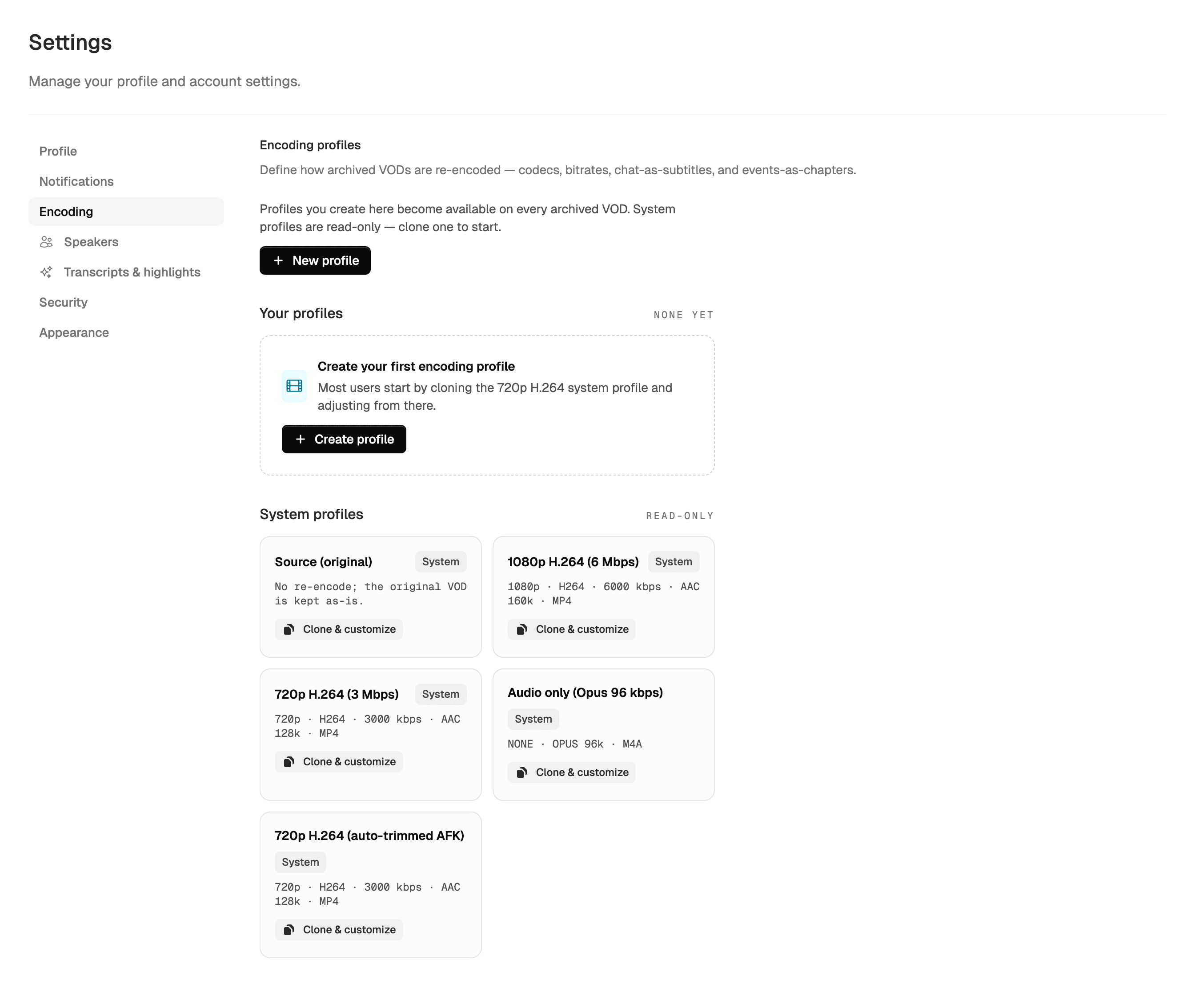
Build per-account profiles for codec, resolution, bitrate, and container. Run them automatically on every newly archived stream, or kick one off manually from a VOD's page. Originals stay untouched — every encoded version is a separate rendition next to the source.
Seeded for everyone
Four profiles, ready out of the box
Use them as-is, clone any of them, or build your own from scratch.
Source
Original (no re-encode)
A placeholder so the rendition list always has at least one entry. Your original archive is the rendition — no ffmpeg work, no extra storage. We keep your originals untouched as the default.
Default
1080p H.264 · 6 Mbps · MP4
Twitch source-equivalent quality. Universally playable — every browser, every player, every device. Good baseline if you only want one re-encode.
Bandwidth saver
720p H.264 · 3 Mbps · MP4
Roughly half the file size of the 1080p profile. Fine for replay, sharing, mobile playback, and anywhere bandwidth matters more than pixel-peeping.
Audio only
Audio Opus · 96 kbps
Strips video entirely. Great for transcription pipelines, podcast editing, or just feeding the audio into another tool. Tiny files — a 4-hour stream lands around 175 MB.
Build your own
Knobs you can turn
Open /settings/encoding in your account, hit "New profile", and dial in the parameters. Every profile is per-user — share none, share with yourself across multiple Twitch accounts.
- Codec
- H.264 — universal. H.265 — half the bitrate at the same quality, but spotty browser support. AV1 — best compression, slow encode, modern players only.
- Container
- MP4 — works everywhere, supports chapters and soft subtitles. MKV — better for SRT subtitles. WebM — for browser-native AV1 + Opus.
- Resolution + bitrate
- 1080p, 720p, 480p, audio-only. Bitrate cap (Mbps) plus optional CRF (constant-rate factor) for variable-bitrate quality targeting.
- Preset speed
- ultrafast → veryslow. Faster = bigger files at the same quality. The default medium preset is the sweet spot for most streams.
- Auto-encode on archive
- Toggle on a profile to run it automatically every time a new VOD finishes archiving. No clicks needed after that.
- Target storage
- Renditions can land in a different storage profile than the original. Cold-tier B2 for archives, fast-tier R2 for replay copies — your call.
Bonus toggles
Embed chat + events directly inside the file
Two flags on every profile that turn the encoded file into a self-contained artifact you can hand off — no separate sidecar files needed.
include_chat_track
Chat as a subtitle track
Embeds the chat replay as a soft WebVTT subtitle track inside the encoded MP4 / MKV. Players show it via the captions menu (CC button). One cue per chat message, 4-second display, formatted as username: message. Adds ~1-2 MB per hour of stream.
include_events_chapters
Events as chapter markers
Embeds memorable stream events (subs, raids, hype trains, category changes) as chapter markers via FFMETADATA1. Most modern players (VLC, mpv, IINA, QuickTime) honor chapters with click-to-seek UI. Negligible file-size impact.
Keep reading
Related guides
Early access
Smart features overview
Transcripts, auto-detected highlights, headline refinement, and AFK trimming — the smart layer that builds on your archives.
More details
Replay
Watching your stream replays
Re-watch archived streams with chat in sync — embedded captions and chapters show up right in the player.
More details
Sizing
How much storage do I need?
Renditions count toward your quota. Estimate how much room your archive — and its encoded copies — needs.
More details
Free for everyone
Ship a smaller copy of every stream, automatically
Encoding profiles are part of the foundation tier — no upgrade required. Set up auto-encode-on-archive once and forget it.